Wireless Networking
Wi-Fi is a standard collection of protocols (IEEE 802.11) that allow for the wireless transmission of network data using radio waves between wireless devices and the wired hardware in a network. Wireless networking devices like access points and routers use Wi-Fi to allow wireless communication with the wired portions of a network.
Overview
It is generally best to connect nodes in entertainment control networks directly using the appropriate Network Wiring. Certain applications, such as the use of smartphone remotes and other portable devices, may require wireless connection capability added to the network.
When wireless capabilities must be added to an entertainment control network, wireless connectivity should only be used for portable control or programming interfaces and remotes, and should not be used for devices running Eos Family software or other permanently-installed lighting equipment.
Some streaming multicast and broadcast data protocols, including Streaming ACN (sACN), can create performance issues on wireless infrastructure. Some ETC wireless applications need to establish both unicast and multicast connections with hardwired ETC devices.
Access Points
A wireless access point (or WAP) is a device that provides a wireless connection point into a physical network. They operate similarly to Network Switches, but with a wired segment replaced by a Wi-Fi connection.
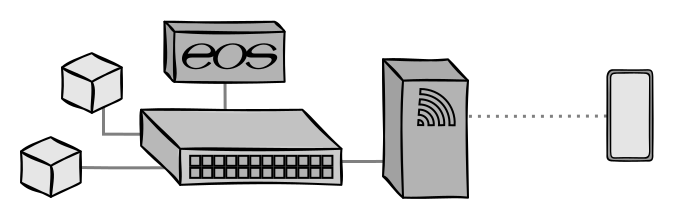
ETC recommends access points when wireless must be added to an entertainment control system, as they do not filter data or allow connections to other networks, simply allowing wireless devices to connect to and communicate as if they were in a wired LAN. When using a WAP, connected wireless devices should be addressed as if they were physically connected to the entertainment control network.
Access points can be obtained in both consumer-grade and professional or commercial varieties. Professional access points typically offer greater signal strength that can reach a wider physical area and connect to more wireless devices at a time.
Routers
A router is a device, often wireless, that passes and filters information between separate LANs. They are typically used to connect LANs to WANs to provide multiple local devices access to the global Internet, but can also be used to connect a LAN to one or more adjacent LANs.
Routers are not recommended for use with Eos and other entertainment control devices, as the connection of two or more networks undermines the Physical LAN Isolation recommended for entertainment control networks. Additionally, their data inspection and filtering functions can add latency and interfere with Multicast communication.

| A | Wireless router | B | Wired router |
Routers inspect incoming data packets for IP Addresses and forward the information to destinations in other networks. They use an internal routing table, a list of the most efficient paths between various network destinations, to ensure the data is delivered as reliably and quickly as possible. They may also filter or block certain types of traffic from passing between networks. Many routers can act as a Dynamic Host Configuration Protocol (DHCP) server. All of these settings and features must be correctly configured in order to not interfere with the functionality of wireless remotes and accessories.
Although commercially-available routers exist, they are generally consumer-grade, designed for home or small business use.
Best Practices
ETC recommends prioritizing security by locking the wireless network with a secure password. Consider using wireless network encryption, hiding the SSID so that it must be manually entered for devices to connect, and powring off access points or wireless routers when not actively in use. As wireless networks lack any physical security, ETC encourages an additional Media Access Control (MAC) Address filtering security layer for wireless devices accessing the entertainment control network.
Before installing wireless networking equipment, it may be beneficial to conduct a wireless deployment survey.
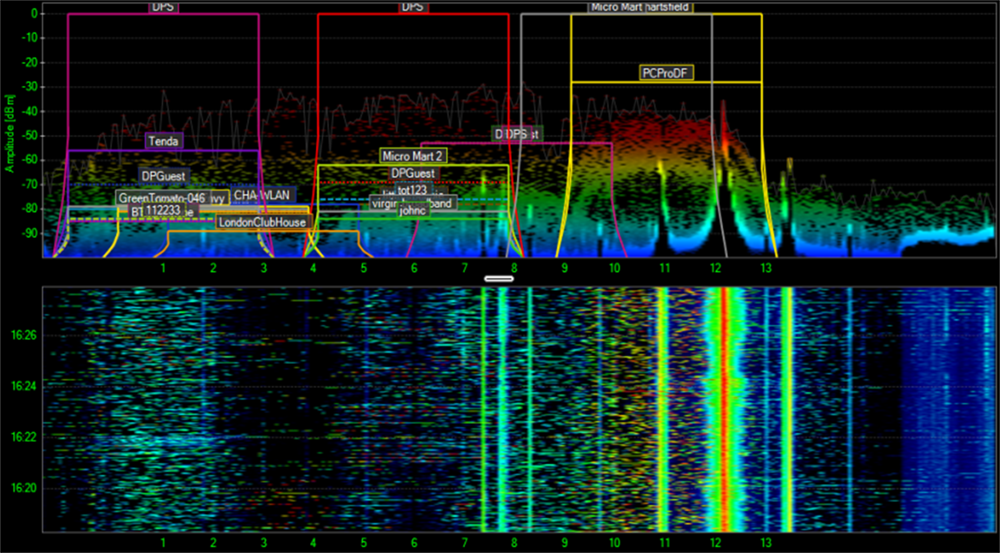
These surveys obtain an overview of the different wireless traffic, channels, and frequency bands already in use in a space, and ensure that any newly-added wireless connections will operate and communicate with as little interference as possible.