Expansion Backups and Failover
Primary, Backup, and Expansion Processor (EEP) devices may each be assigned a Backup Eos Expansion Processor (BEEP) to take over their outputs if they go offline.
Host Backups
As has always been the case, it is recommended to run all sessions with a full-tracking Backup for the Primary Host console. In sessions utilizing Expansion Processing, the same rules for a Host Backup apply: the lesser of the two licenses will be used to determine the license contribution of the Primary-Backup pair. It is recommended to use the same device, hardware version, and output count in a Primary-Backup pair.
If the Primary fails, the Backup will assert control of the session (either automatically or manually, based on settings described below), and all responsibilities of the session will transfer to the Backup, including output ascribed to the Primary, synchronization with EEPs and Clients, and third-party integration like show control.
Expansion Backups
Because of the deterministic nature of Expansion Processing, if an output segment is critical, it must be backed up to ensure output during a failover.
If universes 101-140 are assigned to an EEP that goes offline, those universes will not be generated from anywhere else in the system unless they are reassigned in Setup > System > Processors.
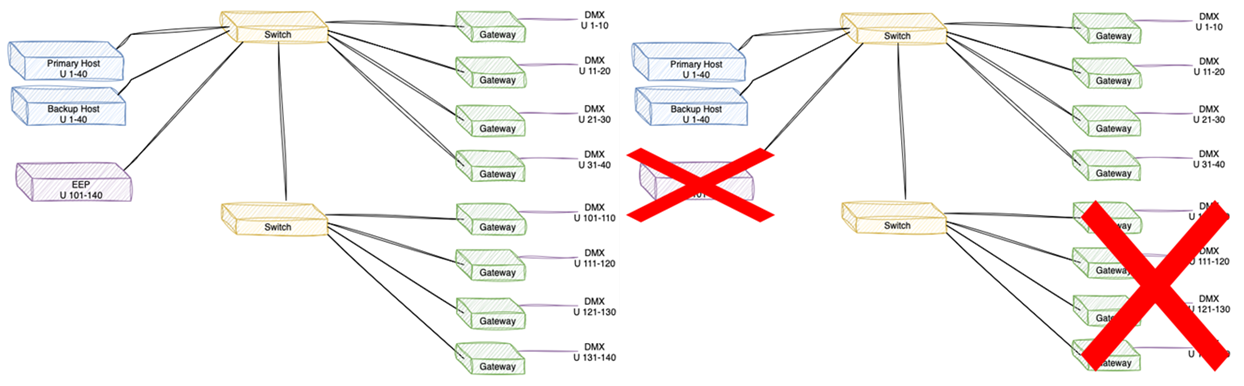
Therefore, it is recommended to have full-tracking BEEPs for each session-critical device. Like Primary and Backup Hosts, an EEP-BEEP pair determines their license contribution to the session by using the lesser or the two licenses. It is recommended to use the same device, hardware version, and output count in an EEP-BEEP pair.
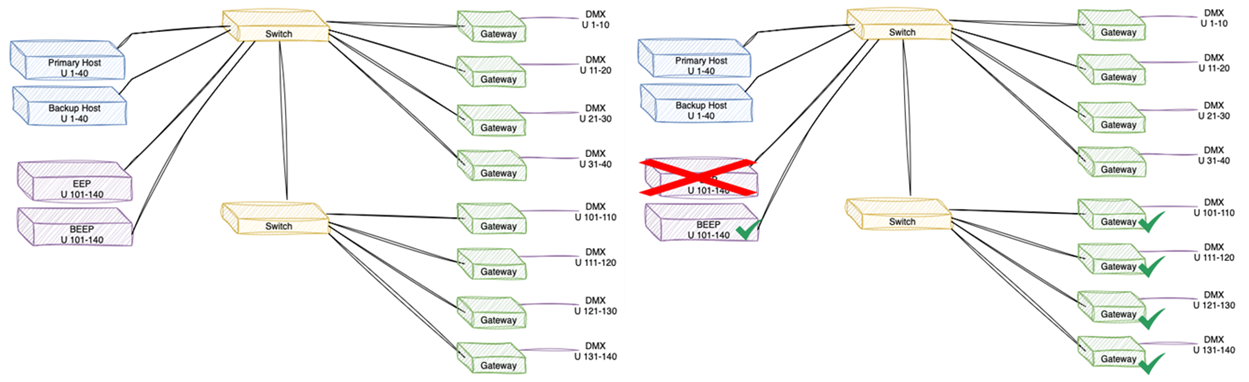
EEP Settings in Setup
There are several settings that determine how failovers are handled session-wide. These settings are in Setup > System > Session, and impact any failover - be it between the Primary and Backup Host, or between an EEP and BEEP pair.
Global Backup Settings
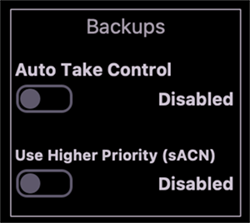
- Auto Take Control - when disabled (default), the affected pair will send a prompt to the session alerting to the outage, and allowing the user to manually force the Backup to take control for its paired device. When enabled, the Backup will automatically take control when it senses a failed connection with its paired device, and will prompt the session that it has taken control.
- Use Higher Priority (sACN) - when a Backup receives control (either manually or automatically), if this setting is disabled, the Backup device will output the sACN its paired device was outputting at the same sACN priority level. If this setting is enabled (default), upon taking control the Backup device will output the sACN of its paired device at one priority level higher. For example, if the failed device was outputting at sACN priority 70, the Backup would output at 71.
EEP Failure Settings
In the event both the Primary and Backup Hosts go offline, a {Hold Last Look} (HLL) setting can be enabled for Expansion Processors, as a way to help a session ride through a temporary loss of all Host devices.
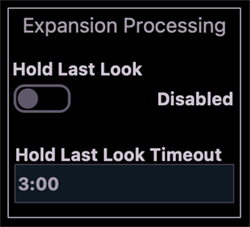
- {Hold Last Look} - if this setting is disabled (default), when an Expansion Processor loses connection with all Hosts, it will recognize the disconnected state, stop output, and await a Host to rejoin the session. If this setting is enabled, the Expansion Processor will continue to output at its last known playback state, including dynamic elements like auto-called cues and effects.
- Hold Last Look Timeout - if HLL is enabled, this setting determines how long HLL behavior will be active. If the time expires and a Host has not rejoined the session, the Expansion Processor will recognize the disconnected state, stop output, and await a Host to rejoin the session.