Sequence Run / Step Control
Sequences play back on the playback faders. A sequence may contain up to 99 steps with fade and step timing.
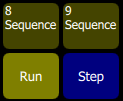
The Sequence Run/Step button is located in the Playback Toy display. A Sequence Run/Step button will display below each sequence and will only control that particular sequence. The button is a toggle that either lets you stop a sequence so you can manually go through the steps by pressing the bump button, or it runs through the steps automatically.
Operation
- Select a bump for the playback you want to stop or start.
- Running sequences are indicated by a yellow bump button.
- Stopped sequences are indicated by a blue bump button.
- Stopped sequences may be advanced by pressing the blue bump button.
Stopped sequences may be used as additional cue lists if required.