Macro Editor View
The Macro Editor is a script creation tool used to create custom functions for actions or events. In this view the Plan workspace is replaced with a Macro workspace, but the Browser, Folders and Property Editor are located in their respective areas for object selection and property editing.
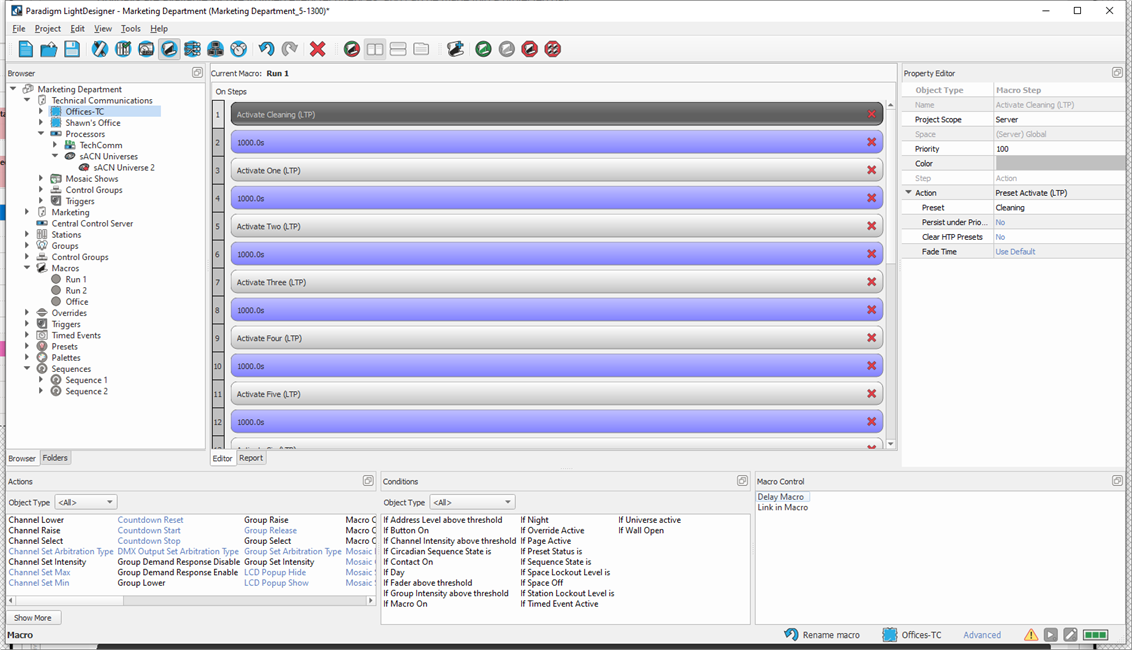
The Macro workspace displays the steps, conditions, and controls of a selected macro as it is currently defined. The lower section of the view displays the Actions, Conditions, and Macro Control libraries used to build your macros.
- Actions are any automated step that affects a space or object in the configuration.
- Conditions list "if" conditional statements for when any action or set of actions is performed as the macro executes.
- Macro Controls are tools to delay or link steps within a macro.
The Show More button  beneath the Actions list toggles the actions to display more or less options. The available actions are dependent on the user's access level. Advanced user level actions are displayed in blue color for the sample graphic above.
Reference Create a Macro and Execute a Macro for more details.