
Fader
A fader is a primary control element in touchscreen configurations.
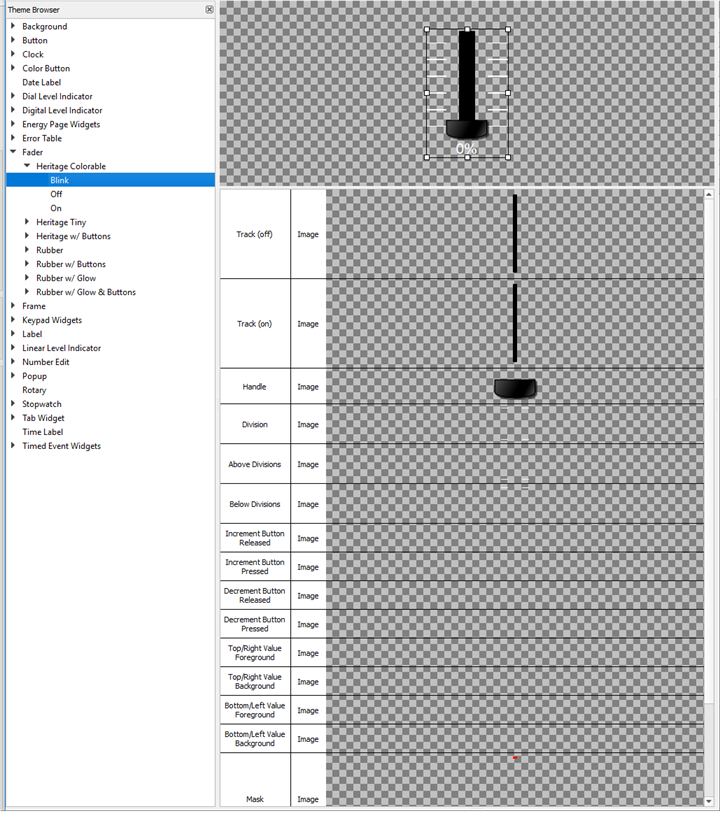
The following skin elements are supported by a Fader:
- Track (off) - the part of the track above the current handle position
- Track (on) - the part of the track below the current handle position
- Handle - the movable handle of the fader
- Division - a mark that identifies a snap to point on a fader track
- Above Divisions - a mark that identifies a snap to point on the top of the fader track
- Below Divisions - a mark that identifies a snap to point on the bottom of the fader track
- Increment Button Released - the button to increase the handle position without moving the fader handle - shown when not pressed
- Increment Button Pressed - the button to increase the handle position without moving the fader handle - shown when being pressed
- Decrement Button Released - the button to decrease the handle position without moving the fader handle - shown when not pressed
- Decrement Button Pressed - the button to decrease the handle position without moving the fader handle - shown when being pressed
- Top/Right Value Foreground - the image drawn above the value on the top/right of the fader
- Top/Right Value Background - the image drawn behind the fader value on the top/right of the fader
- Bottom/Left Value Foreground - the image drawn above the fader value on the bottom/left of the fader
- Bottom/Left Value Background - the image drawn behind the fader value on the bottom/left of the fader
- Mask – see Mask Element
- Pressed (Sound) - the sound played when the increment or decrement button is pressed
- Released (Sound) - the sound played when the increment or decrement button is released
Note: If the increment and decrement button elements are defined, the buttons will be drawn at either end of the fader, otherwise the buttons will not be drawn.If the increment and decrement button elements are defined, the buttons will be drawn at either end of the fader, otherwise the buttons will not be drawn.
The handle is drawn at the native height of the resource assigned to it, and will fill the width of the fader, observing whatever scaling option is assigned to the resource. It is common for the fader "Track (On)" and "Track (Off)" to be identical and to use the position of the fader handle to represent the current level. The handle resource may need to be padded with transparent area depending on the track resources used.