
Stopwatch Properties
A stopwatch can be used in a configuration to display a counter on an LCD. A stopwatch widget requires separate start and stop button controls, which are assigned actions in LightDesigner. A complete list of button functions is available in LightDesigner. See etcconnect.com/docs/Paradigm-processor-mk2 for related LightDesigner documentation.
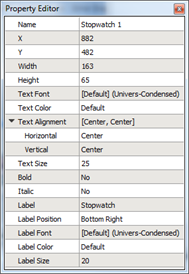
A stopwatch widget has the following editable properties in addition to the Basic Properties :
- Text Font - the font used to display the text on the stopwatch
- Text Color - the color of the text displaying the stopwatch
- Text Alignment - the vertical and horizontal alignment of the text displaying on the stopwatch
- Text Size - the height of the text (in pixels) of the stopwatch
- Bold - a "Yes" or "No" setting used to bold the text on the stopwatch
- Italic - a "Yes" or "No" setting used to emphasize the text on the stopwatch
- Label – a text label for the stopwatch
- Label Position - the vertical and horizontal alignment of the stopwatch label text
- Label Font - the font used to display the level stopwatch text
- Label Color - the color of the text displaying the stopwatch label
- Label Size - the height of the text (in
Note: The stopwatch counter and the stopwatch start/stop buttons must be in the same unique "Control Group" in LightDesigner.
Reference Control Properties for instructions to configure each property.