
Number Edit
The Number Edit control is used to open a numeric keypad for entry of specific numeric data such as channel level, fade time, fade rate, etc.
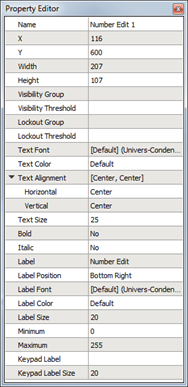
A number edit widget has the following editable properties in addition to the Basic Properties :
- Text Font - the font used to display the text on the number edit label
- Text Color - the color of the numerical text displayed on the date label
- Text Alignment - the vertical and horizontal alignment of the numerical text displayed on the date label
- Text Size - the height of the text (in pixels) of the numerical text displayed on the date label
- Bold - a "Yes" or "No" setting used to bold the numerical text on the date label
- Italic - a "Yes" or "No" setting used to emphasize the numerical text on the date label
- Label – a text label for the number edit
- Label Position - the vertical and horizontal alignment of the number edit text
- Label Font - the font used to display the level number edit text
- Label Color - the color of the text displaying the number edit label
- Label Size - the height of the text (in pixels) of the number edit label text
- Minimum - defines the minimum value that can be displayed
- Maximum - defines the maximum value that can be displayed
Note: Minimum and maximum values set in ControlDesigner only determine what values may be displayed. These settings do not reflect what values may be entered from the Paradigm Touchscreen.
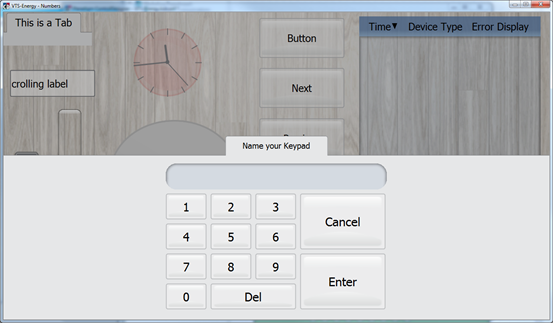
- Keypad Label - the text label that displays on the keypad in the configuration when the number edit button has been activated
- Keypad Label Size - the height of the text (in pixels) of the numerical text displayed on the Keypad Label
Reference Control Properties for instructions to configure each property.