
Fader Properties
A fader provides the ability to control the level of a configured system attribute, such as a zone, preset, etc., from a linear fader.
Faders may be created in a vertical or horizontal orientation, although when a fader is initially drawn, its orientation is set based on the aspect ratio of the control. You can change the orientation settings in the Property Editor.
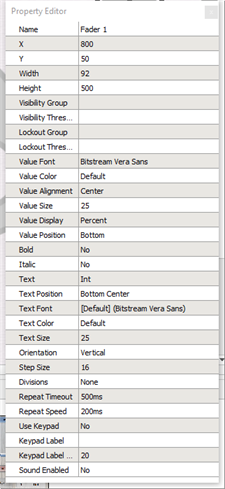
A fader has the following editable properties in addition to the Basic Properties:
- Value Font - the font used to display the value on the fader
- Value Color - the color of the value on the fader
- Value Alignment - the alignment of the value on the fader (left, right, center)
- Value Size - the height of the value text (in pixels)
- Value Display - the fader level value units (none, raw, or percent)
- Value Position - the location of the level to either top or bottom of fader
- Bold – enable/disable bold character for the value
- Italic – enable/disable italic character for the value
- Text – the text label that is displayed for the fader
- Text Position - the location of the vertical and horizontal alignment of the fader label text
- Text Font - the font used to display the fader label text
- Text Color - the color of the fader label text
- Text Size - the height of the fader label text (in pixels)
- Orientation – the fader orientation, either horizontal or vertical
- Step Size - the resolution of the increment/decrement button functions
- Divisions - the jump to points (snap points) on the fader track
- Repeat Timeout – how long the fader button waits to begin repeatedly changing the level after being pressed
- Repeat Speed – the interval a level increases when a fader button is held down
- Use Keypad - displays a keypad for level entry when the numeric level is clicked. Data is entered in the same format that the current level display (percentage or 0-255).
- Keypad Label - the text label that is displayed for the keypad
- Keypad Label Size - the height of the text (in pixels)
Reference Control Properties for instructions to configure each property.