
Skin Sets
A skin set is a container for skins of particular control or skin type. Skin sets are used to help the application software choose similar skins between each of the themes. This method of containment helps group related skins together and to assign similar skins from other themes when they are changed. When you use a different theme for a configuration than the one currently used, ControlDesigner Software will assign all of the existing controls to a similar skin available in the new theme.
Add a Skin Set
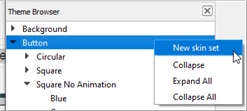
- From the Theme Browser, right-click on the skin type (background, button, fader, etc.) you wish to create the new skin set for.
- Select "New skin set" from the context menu.
Delete a Skin Set
- From the Theme Browser right-click on the skin set you wish to delete.
- Select "Delete" from the context menu.
CAUTION: Deleting a skin set will delete all skins contained in the skin set.
Skin Set Properties
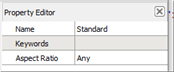
- Name - name used by ControlDesigner Software to identify the skin set.
- Keywords - used to identify similar skin sets between multiple themes.
- Aspect Ratio - this setting is used to constrain a skin set to be in a certain height to width ratio including "Portrait" or "Landscape", "Square" or "Any". Any graphic that is added to a skin must conform to the setting.