
Object Counts
Know exactly how many objects are in your LCD configuration file by reviewing the object counts from the Object Counts widget and from the counts in the status bar.
Widget
The object counts widget, displayed by default beneath the Object Browser, lists all supported object types that are found in your current LCD configuration file.
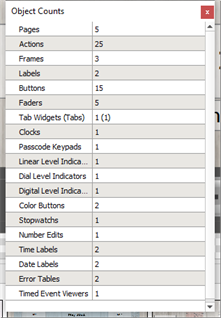
Supported Objects
| Object Type | Object Type |
|---|---|
| Pages | Popups |
| Frames | Calendar Widgets |
| Labels | Tab Widgets |
| Buttons | Faders |
| Linear Level indicators | Dial Level Indicators |
| Digital Level indicators | Color Buttons |
| Stopwatch | Clocks |
| Time Labels | Date Labels |
| Passcode Keypads | Number Edits |
| Number Edit | Error Tables |
| Actions | Time Event Viewers |
Status Bar
The object counts that are listed in the status bar are a subset of objects including pages, popups, buttons, faders, and labels.
