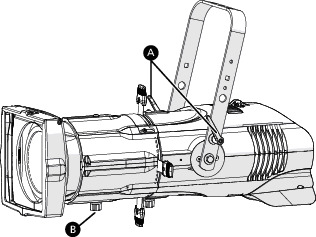
Focus the Fixture
- Apply power to the fixture, and wait until the fixture has booted up (the ETC splash screen displays during boot up).
- Press any encoder to "wake" the display. If necessary, navigate to the DMX screen: Press the Function button (
 ), use the Intensity encoder to navigate to DMX Mode, and then press the Intensity encoder to select it.
 - Press any encoder to leave the view-only screen, and then press the Intensity encoder to turn on the LED array. The Focus Mode screen displays:
- The display shows a timeout countdown to indicate how long the LED array will remain on at 100% intensity. You can turn the Intensity encoder to reset the timeout countdown to 5 minutes.
- Current Tilt displays the current angle of the fixture. You can use the blue encoder to set a Target for the angle. This angle is saved to the fixture configuration.
WARNING: When adjusting the fixture tilt, be aware that a lens tube adds weight to the front of the fixture. Use caution to control unintended fixture movement when adjusting the fixture tilt.
AVERTISSEMENT : Lorsque vous ajustez l'inclinaison de l'appareil, sachez que le nez optique ajoute du poids à l'avant de l'appareil. Soyez prudent afin de contrôler des mouvements involontaires du luminaire lors du réglage de son inclinaison.
- Adjust the fixture to the desired position:
- Loosen the yoke tilt-locks
- Loosen the beam focus knob
- Loosen the yoke tilt-locks
- Press the Intensity encoder to turn off the LED array.