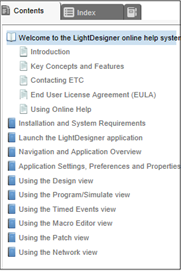
Our LightDesigner online help system makes it easy to find the answers you need to program your Paradigm architectural control system.
The online help display is split into two sections, the left side which displays the active window pane functions (Contents, Index, and Glossary) and the right side which displays the content of the selection.
 is displayed on the top right corner of the page. Enter one or more keywords in the field and click the search button or press enter. Links to topics containing the search keyword(s) are listed in the content section of the page. Clicking on a topic link displays the associated topic page.

The help system toolbar located above the content section of the page provides tools to print topics, expand or collapse all drop down text on the page, remove highlights from search text, navigate to the next or previous topic in the system.
Click the "Related Topics" link located at the bottom of a topic page to see a list of topics that are related to the displayed topic. Clicking on any of the related topics in the list will automatically direct you to that topic. To return to the previous topic, click the [Navigate previous] button located in the help system toolbar.
LightDesigner online help content is accessible to people with disabilities—such as mobility impairments, blindness, and low vision. Online help supports these standard accessibility features: