Patch by Space
While in Patch view, selecting the project node or an individual sub-space from within the Browser or Folders panel shows the Control Channels display. The selected space is titled on top of the page and all channels in the space that have been scoped to the selected space are listed in order based on the channel identification number.
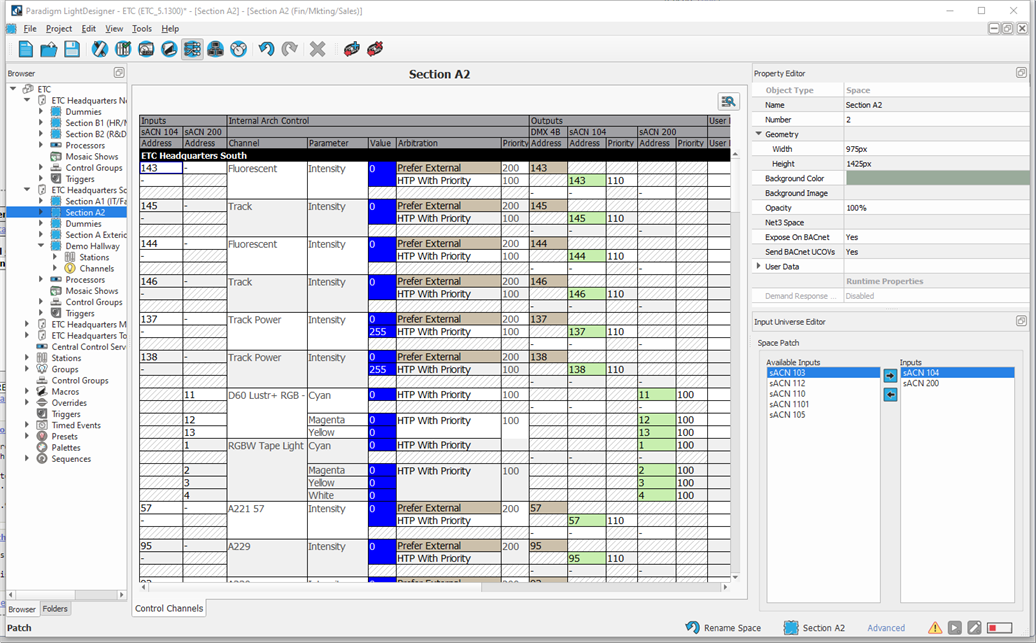
From the Control Channels display you can:
- edit the DMX input and sACN input patch
- edit the arbitration settings for each channel (click inside the "Arbitration" cell for the channel and select a new setting from the options available)
DMX Output Relationships
When patch by space is the selection, you can add or remove DMX output relationships for the patched channels using the [Add Output] and [Remove Output]  tools in the main toolbar. Clicking [Add Output] displays an "Add Output Universe" dialog. Select the universe from the available outputs in the drop-down menu, and then click [OK].