Processor and Universe Properties
Selecting a processor, a processor's DMX input or output port, or the sACN universe displays the objects respective properties in the Property Editor.
 Processor Properties
Selecting a processor from the Browser displays that processor's properties in the Property Editor.
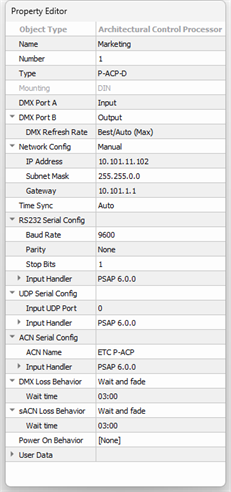
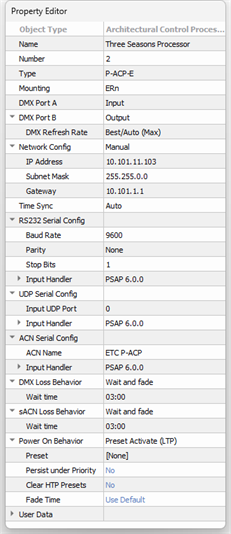
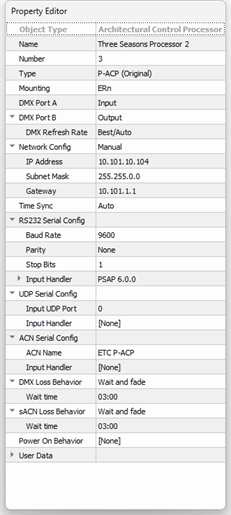
| P‑ACP‑D Mk2 | P‑ACP‑E Mk2 | P‑ACP Mk1 |
|---|---|---|
|
|
|
- Object Type - the type/style of object you have selected. This property is not selectable or editable.
- Name - the name of the processor
- Number - the order in which the processor appears in the Browser unless a custom "User Sort" has been specified. This "Number" property can be edited, although you will be notified immediately by dialog if a processor number conflict occurs.
- Type - the type of Paradigm Processor. Options include P‑ACP‑D Mk2, P‑ACP‑E Mk2, and P‑ACP (Original).
- Mounting - sets the installation type for the selected processor.
- A P‑ACP‑D Mk2 defaults to DIN mounting (read‑only)
- An enclosure-based processor (P‑ACP‑E Mk2, P‑ACP Mk1) is compatible with either the DRd or ERn
- DMX Port A and DMX Port B- sets whether the selected port is enabled or disabled and reflects the I/O properties that were set for the processor ports in the New Project Wizard. DMX port configuration depends initially on the mounting for the specified processor type.
- DMX A Config and DMX B Config - configure the enabled port as an input or an output. DMX port configuration depends on the mounting type for the specified processor.
- DMX Refresh Rate - set the output rate of the DMX port. By default, this property is set to "Best/Auto (Max)".
Note: If DRd is specified as the mounting for the enclosure-based processor, DMX Port B is set to "Output" and is not selectable for edit. DMX Port A may be configured for either an "Input", "Output", or "Disabled" as needed for the installation.
A DIN-mounted or ERn-mounted processor defaults DMX Port A as an Input and DMX Port B as an Output. Both properties are selectable and editable to meet your installation requirements.
- Network Config - displays network communication properties that were set for the processor in the New Project Wizard. From this property you can change the properties between "Automatic" and "Manual" configuration and specify the IP Address, Subnet Mask and Gateway.
- Time Sync - sets where the Paradigm Processors in the project will look to synchronize its clock (time) for timed events, etc, using standard NTP time service. You can set each processor individually to either "Server" or "Client" or "Auto". By default, this is set to "Auto". You can have only one time server per system. When set to "Auto", the first processor in the project (Processor 1) will be the default timeserver.
- RS232 Serial Config - set the baud rate, parity and stop bits for serial communication to the processor. By default, properties are 9600, None, 1 Stop bits.
- Input Handler - configures the handling of data received from the processor's local RS232 interface. By default this is set to PSAP 6.0.0 (PSAP = Paradigm Serial Access Protocol). Up to 20 custom strings and actions are available. See the Paradigm Serial Access Protocol (PSAP) Configuration Guide, available for download on the ETC website at etcconnect.com/Docs/Paradigm-Processor-Mk2/.
- UDP Serial Config - set the UDP port for basic Ethernet communication to the processor. By default this setting is "0".
- Input Handler - configures the handling of data received from the processor's Ethernet interface for the purpose of receiving basic Ethernet control. PSAP 6.0.0 or None are the available options. Up to 20 custom strings and actions are available.
- ACN Serial Config - set the ACN communication to the processor. By default the ACN Name is "ETC P‑ACP".
- Input Handler - configures the handling of data received from the processor ACN interface for the purpose of receiving ACN and PSAP control. PSAP 6.0.0 or None are the available options. Up to 20 strings and actions are available.
- DMX Loss Behavior - sets the behavior for the processor when the DMX input is lost. By default, this property is set to "Wait and fade".
- Wait Time - the length of time the processor waits before fading when DMX is lost. By default, this property is set to 3 minutes. This property is ignored when the loss behavior property is set to "Hold Last Look".
- sACN Loss Behavior - sets the behavior for the processor when the sACN input is lost. By default this property is set to "Wait and fade".
- Wait Time - the length of time the processor waits before fading when sACN is lost. By default, this property is set to 3 minutes. This property is ignored when the loss behavior property is set to "Hold Last Look".
- Power On Behavior - sets the action taken when power is restored to the processor after a power cycle. Many options are available including "Channel Set Intensity", Group Set Intensity", Preset Activate, etc.
- Additional properties display according to the selected Power On Behavior. Completely define each property for the best results.
- User Data - each object is provided with up to eight User Data Tags that can be used in object identification, such as Folders and Smart Folders filtering and spreadsheet sorts. These are labeled User Data 1, User Data 2, etc. by default, but the tags can be customized in the Edit User Data Tags option under the Project menu.
DMX Universe Properties
Selecting an input or output port for a processor from the Browser displays that port properties in the Property Editor.
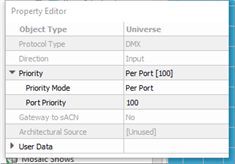
- Object Type - the type of object you have selected. This property is not selectable or editable.
- Protocol Type - the type of protocol used for the selected port. This property is not selectable or editable.
- Direction - a "view only" property that indicates data flow as input/output or both.
- Priority - (input ports only) set the priority mode and port priority for the selected input port.
- Priority Mode - sets the priority on a per address or per port basis.
- Port Priority - sets the priority for an entire port when "Per Port" is selected or serves as the default for every address when "Per Address" is selected. The default priority is 100 and the allowable range is 1-200, where 200 is the highest priority. Lower priority control of an object will not operate if a higher priority control for the same object is active. This can be used to designate "more important controls".
- Gateway to ACN - a "view only" property that indicates if there is an sACN gateway between the DMX output port and a sACN universe.
- Architectural Source - a "view only" property that indicates which processor will source architectural control using the selected Universe or port. DMX ports automatically assign the source.
- User Data - each object is provided with up to eight User Data Tags that can be used in object identification, such as Folders and Smart Folders filtering and spreadsheet sorts. These are labeled User Data 1, User Data 2, etc. by default, but the tags can be customized in the Edit User Data Tags option under the Project menu.
sACN Universe Properties
Selecting an sACN universe from the Browser displays that port properties in the Property Editor.
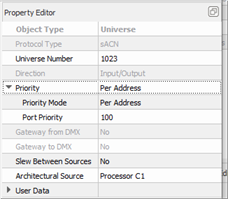
- Object Type - the type of object you have selected (view only).
- Protocol Type - a "view only" property that indicates the type of protocol used for the selected port.
- Universe Number - is the sACN universe number and order in which they appear in the Browser unless custom "User Sort" has been specified. The Universe Number can be edited, although you will be notified immediately by dialog if a processor number conflict occurs. Follow the dialog to continue. The valid range for a universe numbers is 1 to 63999.
- Direction - a "view only" property that indicates data flow as input/output or both.
- Priority - set the priority mode and port priority for the selected port.
- Priority Mode - sets the sACN priority on a per address (default) or per port basis.
- Port Priority - sets the priority for an entire port (100 by default) when "Per Port" is selected or serves as the default for every address when "Per Address" is selected. The default priority is 100 and the allowable range is 1-200, where 200 is the highest priority. Lower priority control of an object will not operate if a higher priority control for the same object is active. This can be used to designate more important controls.
- Gateway from DMX - a "view only" property that indicates if there is an sACN gateway between the DMX output port and a sACN universe.
- Gateway to DMX - a "view only" property that indicates if there is an sACN gateway between the DMX output port and a sACN universe.
- Slew Between Sources - anadvanced property for users that prefer LED emitters to fade between internal and external values, rather than snapping between the values. Enabling Slew Between Sources also allows the Paradigm Processor to retransmit incoming sACN levels when they would win according to the arbitration rules.
- Architectural Source - sACN universe source is user selectable from the available processors once channels have been patched to the universe. This property specifies which processor will source those patched channels. This property does not affect DMX to sACN gateway behavior and defaults to Processor 1.
- User Data - each object is provided with up to eight User Data Tags that can be used in object identification, such as Folders and Smart Folders filtering and spreadsheet sorts. These are labeled User Data 1, User Data 2, etc. by default, but the tags can be customized in the Edit User Data Tags option under the Project menu.