Channels Properties
Selecting a channel displays its properties in the Property Editor. Depending on the type of channel selected, a simple "intensity only" dimmer or a multi-parameter fixture, the individual parameters for each channel type can vary.
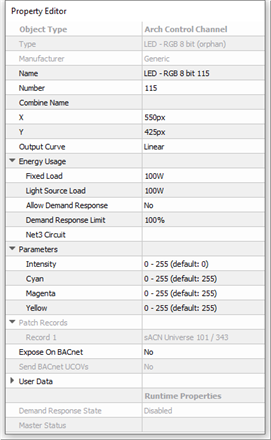
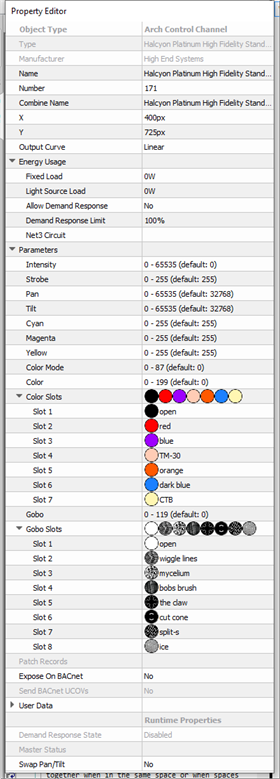
- Object Type - the type of object you have selected. This property is not selectable or editable.
- Type - the type of channel you have selected. This property type originates from the fixture or zone library.
- Manufacturer - the manufacturer of the selected object type. This property is read-only and populates from the fixture or zone library.
- Name - the name of the channel.
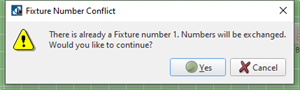
- Number - this is the defaulted numeric order in which the channel appears in the Browser unless a custom User Sort has been specified. This "Number" property can be edited, although you will be notified immediately by dialog if a channel number conflict occurs. Follow the dialog to continue.
- Combine Name - channels that share the same "Combine Name" will operate together when in the same space or when spaces are combined through a wall. Channels of a space will also affect channels within local sub-spaces when "Combine Names" match.
- X & Y - the X and Y location of the channel (in pixels) in relation to the space it is located.
- Output Curve - set the output curve for your patch records.
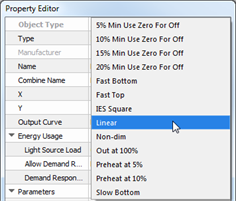
- Energy Usage - load properties related to collection of energy data for use with a broader Energy Management features.
- Fixed Load - the minimum power consumed by the load, in Watts (present only in channels with non-intensity only values).
- Light Source Load - the maximum consumed by the load in watts at 100% intensity minus the Fixed Load value.
- Allow Demand Response - setting this property to Yes enables this fixture / zone for inclusion in Demand Response load shedding when the utility provider demands a reduction in power consumption in exchange for discounts or reductions in rates charged by the utility.
- Net3 Space - property for configuring the index value (acceptable range 1-255) for the related space that contains measured loads for Paradigm's Energy Management reporting feature.
Note: Net3 Space values are a container for channels with Net3 Circuit values within that space. Channels that are in sub-spaces require their own Net3 Space value. Each space and sub-space must have a unique Net3 Space number.
- Net3 Circuit - property for configuring the index value (acceptable range 1-65535) for the related load within a configured Net3 Space. The related circuit data is stored in Net3 Conductor and recalled for Paradigm's Energy Management reporting feature.
Note: A channel's Net3 Circuit property displays for specification only after the Net3 Space property is specified for the containing space. Net3 Circuits must have a unique Net3 Space and Net3 Circuit number. If a channel receives its Net3 Circuit value through an import load schedule process, but without a Net3 Space value specified, errors will generate in the Error Browser for user resolution.
- Parameters - set the parameters for the channel or fixture. All parameters for a selected channel are displayed for selection and edit. Parameter properties may simply include intensity for intensity only channels, or it can include color and beam media, focus controls, and pan and tilt parameters. The current default output level of each parameter is displayed but you can edit any property to meet the installation requirements.
Note: A multi-parameter channel with gobos will display the "Gobo Slots" and "Gobo Slots 2" already populated with factory defaulted gobos as defined in the fixture library.
- Patch Records - records and displays which processor(s), sACN universe(s), and DMX port(s) the channel is patched.
- Expose on BACnet - when enabled, exposes the proprietary object data to a BACnet client, reflects the state / condition and permits control.
- Send BACnet UCOVs - when enabled, sends change of value messages which can be viewed using a BACnet client.
- User Data - eight "User Data" property fields are provided for user specified data for sorting and filtering.
- Runtime Properties - this is a "view only" property
- Demand Response - displays the current Demand Response status
- Master Status - displays the affected space and the master slider value of the controlled channel.
- Swap Pan/Tilt - a "Yes" or "No" parameter used to exchange pan and tilt levels. This parameter displays for a moving light only.