Fixture Editor
Eos provides you with the ability to create your own fixture type within patch and store it with your show file. You can name the fixture, assign all necessary parameters, define the address and operational range of those parameters, see fixture modes and their properties, and set lamp controls.
The fixture editor is accessible from Patch [Tab 12]. There are two main ways to create fixtures from scratch:
- Creating fixtures Using the Fixture Wizard.
- Creating Fixtures in the Editor directly.
Once a fixture has been created, it is stored in the show file. It is not added to the fixture library. If you want to use the created fixture in another show file, see Merging Custom Fixtures into a New Show File.
Fixture Profile List
To open the fixture editor, open the patch display and press the {Fixtures} softkey. This will open a list on the left displaying those same fixtures that are currently patched or have been added to the show, and the list on the right are the parameters for the selected fixture.
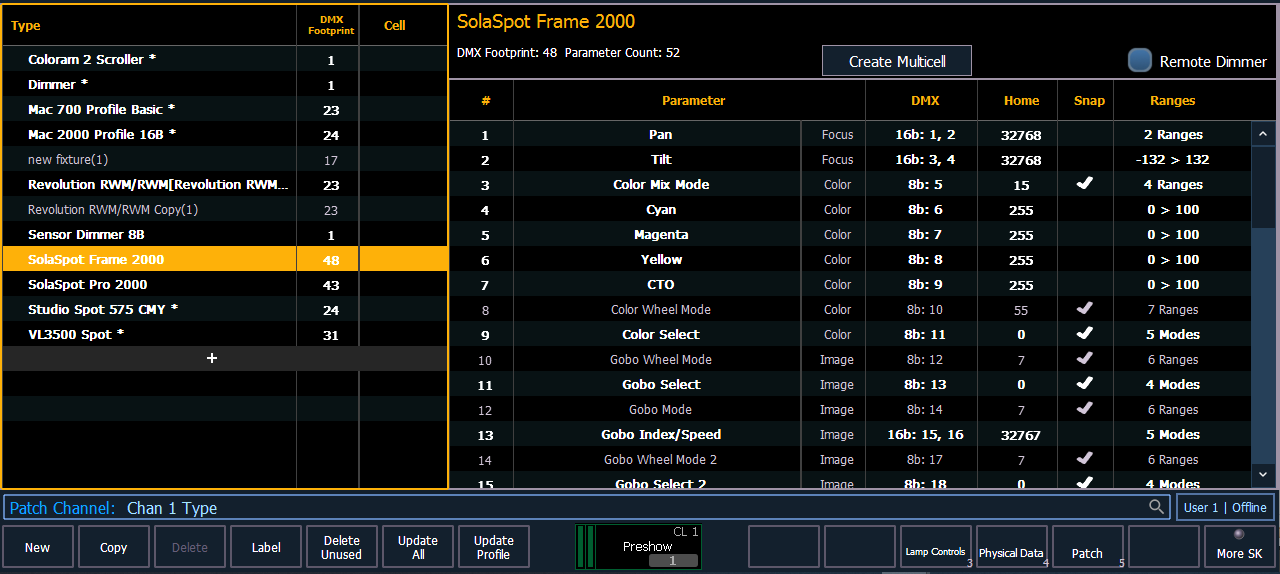
Use {Delete Unused} to remove any unused fixture profiles from the list.