
Property Editor
The Property Editor is located on the right side of the application view and displays the selected skin set or skin element properties including the margins, text color, keywords and color hints.
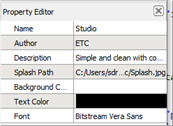
Use the editor to view and modify the properties of a selected skin set or skin. Individual elements of a skin can be edited by selecting them in the Resource Library and making changes in the Resource Editor.