Color Button Properties
A color button can be used to provide an easier method of changing color on a multi-parameter fixture from a single button on the Paradigm Touchscreen. The "Color Button" offers both a HSB color wheel and RGB faders for color selection.
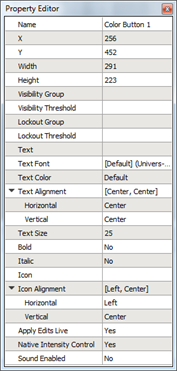
A color button has the following editable properties in addition to the Basic Properties:
- Text - the text label for display on the color button
- Text Font - the font used to display the text on the color button
- Text Color - the color of the text displaying the color button
- Text Alignment - the vertical and horizontal alignment of the text displaying on the color button
- Text Size - the height of the text (in pixels) of the color button
- Bold - a "Yes" or "No" setting used to bold the text on the color button
- Italic - a "Yes" or "No" setting used to emphasize the text on the color button
- Icon - available icons (from the selected theme) that can be applied to the color button.
- Icon Alignment - the vertical and horizontal alignment of the icon displaying on the color button
- Apply Edits Live - defaults to "Yes", when editing the color selection on the color wheel, output updates in real time. If "No" is selected, the output will apply when the color picker is closed.
- Native Intensity Control - when set to "Yes" (default setting), the touchscreen configuration will support its own intensity parameter. When set to "No", intensity is controlled by another control.
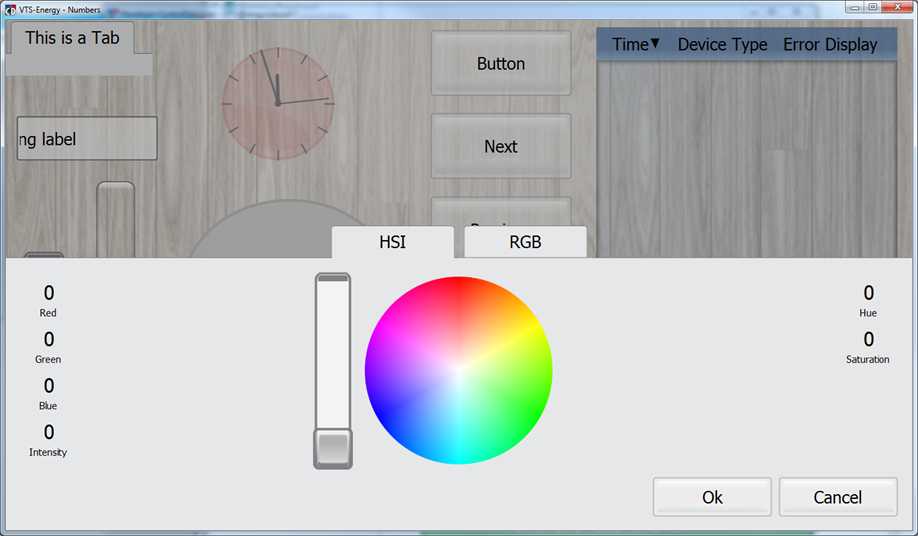
Note: Configurations created prior to v4.0.0 software may want to continue operating with the previously configured functionality (e.g. using a brightness control to adjust intensity). In this instance, setting the Native Intensity Control property to No will disable the Intensity Control from the configuration.
Reference Control Properties for instructions to configure each property.